AI-powered QuickBooks migration
· 6 min read
For a small granola business with both direct-to-consumer (DTC) and catering operations, a monthly close had become hours of manual work. Online orders, in-person sales, catering and wholesale invoices, and bank deposits each told part of the story. Bringing those records together by hand took time, and QuickBooks offered little help while its balances could not be trusted.
I delivered a QuickBooks migration and AI automation package that moved the business away from manual spreadsheet bookkeeping. We started by establishing reliable opening balances and correcting how transactions flowed into the accounts. Then we automated routine revenue and expense classification, with an owner reviewing uncertain items and approving the monthly close. The resulting workflow auto-classified about 95% of revenue and expense items and reduced monthly bookkeeping and close effort by 75%. The same data also became the foundation for channel-level financial analysis.
Data foundations
Before the migration, a Google Sheet served as the working set of books. The owners spent roughly ten hours a month updating, reconciling, and reviewing it. QuickBooks received Shopify and Square feeds and handled some invoicing, but the monthly reconciliation process remained manual and centered on the spreadsheet.
The two systems also recorded activity differently. The spreadsheet recognized wholesale sales when invoiced and other activity when cash moved, while QuickBooks was configured for accrual reporting. That mixed timing made comparisons difficult. More fundamentally, QuickBooks had never been reconciled to the bank statements. Legacy holding accounts appeared as cash, and some bank rules counted settlement deposits as new revenue even though the original sales were already recorded. The full balances of the owners’ equity accounts had also been recorded as additional income. Overlapping connector histories added further duplication.
The first step was to establish a dependable starting point. A journal entry aligned the real bank accounts with their statement balances at a chosen cutover date and cleared erroneous legacy holding balances. Older feed items and overlapping connector transactions were excluded from the active migration scope. This gave the work a defined boundary while preserving the historical records and keeping older cleanup items separate.
We then corrected the transaction paths. Sales recorded by a payment platform and the later payout describe different stages of the same flow of money; counting both as revenue overstates sales. Deposits were matched to their corresponding payouts or invoice payments, and duplicate postings were corrected. Cash sales belonged in cash on hand, with later bank deposits treated as transfers. A reliable accounting foundation was a prerequisite for automation: every transaction needed a clear destination, and the bank balances needed to agree with the statements.
AI classification with human review
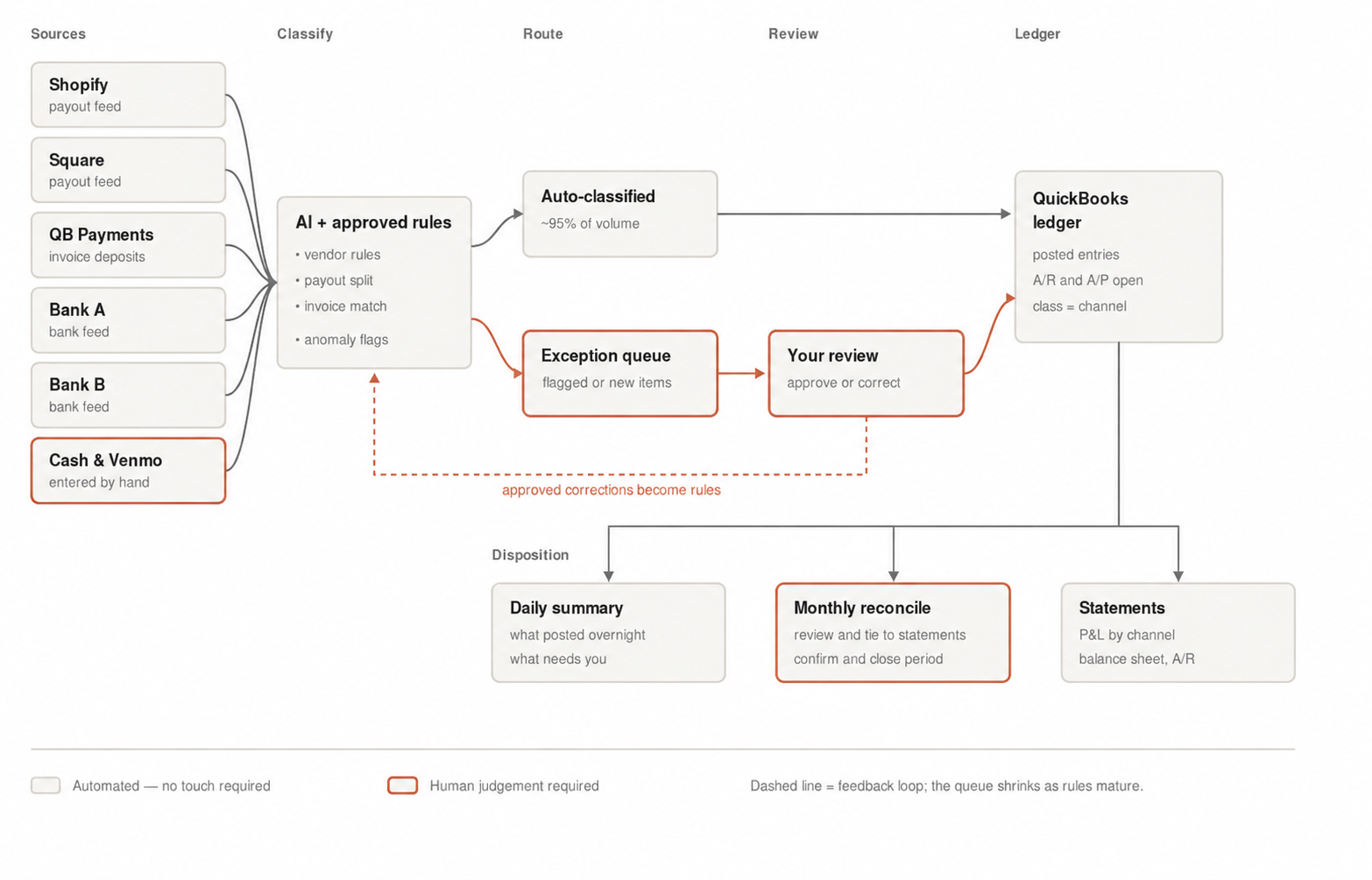
With that foundation in place, the workflow could handle routine classification without asking someone to inspect every line. Transactions from the commerce platforms, invoice payments, and bank feeds passed through AI-assisted classification and a shared set of approved rules. Vendor patterns, payout structure, and invoice matches helped determine the appropriate accounts. Cash transactions still required manual entry into QuickBooks before joining the same bookkeeping process.
The workflow had two routes. Familiar items with a sufficiently reliable classification went directly to the appropriate ledger accounts. New, unusual, or uncertain items entered an exception queue for an owner to approve or correct. This made the review workload more focused: attention went to the transactions that needed judgment, instead of repeatedly categorizing the same recurring expenses and receipts.
Human review also improved the system: an approved correction could become a reusable classification rule. A one-time decision did not automatically become a permanent rule. The reviewer could decide whether it represented a pattern worth adding to the shared rule set. Initial rules were tested in review mode, with automatic posting reserved for consistently reliable, approved cases. That feedback loop allowed coverage to improve while keeping control over how the books were maintained.
A faster close and a clearer business picture
About 95% of revenue and expense items could now be classified automatically into the appropriate accounts. Monthly bookkeeping and close effort fell by 75%. Monthly work dropped from ten hours to about two and a half. The improvement came from removing repeated entry, classification, and transaction matching from the routine.
The remaining human work was specific: enter cash transactions, resolve flagged or new items, and review the final account ledgers. After the exceptions were cleared and the accounts tied to their bank statements, reconciliation was ready for final confirmation in QuickBooks. The one-click finish came at the end of that review; an owner still approved reconciliation and closure.
QuickBooks became the working record for ongoing bookkeeping and tax preparation. Its chart of accounts organized the transactions, and the associated ledgers replaced the spreadsheet’s monthly revenue and expense tabs. The owners could work from a common set of records rather than maintain parallel versions of the books. The migration also made the distinction between revenue, payments received, and transfers between accounts explicit.
The cleaner books became a practical tool for understanding the business. I used the transaction data to build analytics and visuals showing profit and loss by channel, including DTC and catering, giving the owners a clearer view of how each line of business contributed to the overall result. Consistent classification made those comparisons possible without rebuilding the analysis from spreadsheet tabs each month.
I also used the data to clarify working-capital needs: how the timing of customer receipts, inventory purchases, and operating expenses affected the cash available to run the business. Channel-level P&L explained where earnings came from; the working-capital views helped explain when that activity would translate into available cash. The result was a faster monthly close and a much better basis for planning the next month’s operations.